Growing a managed service provider sounds simple until the day your team is juggling dozens of client networks at once. Suddenly, every after-hours fix, patch, and password reset competes for attention, and the tools that felt fine at five clients start to creak at fifty.
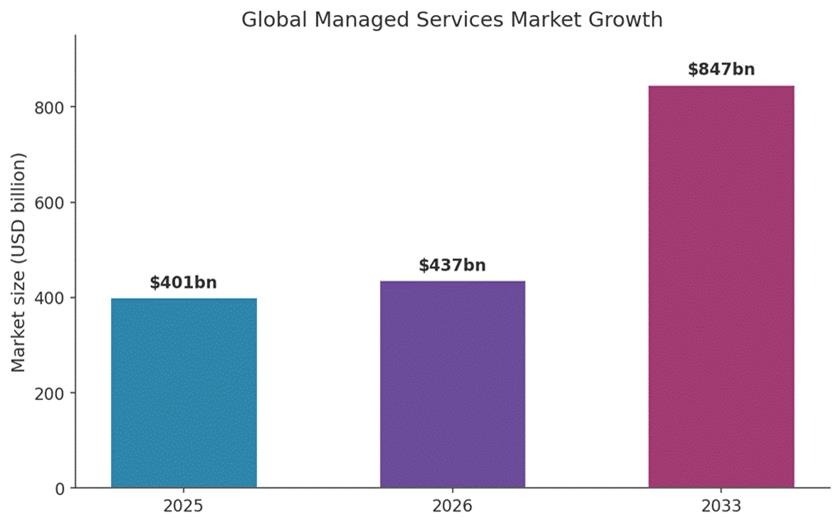
The opportunity is genuine. The global managed services market sat at roughly 401 billion dollars in 2025 and is forecast to reach about 847 billion dollars by 2033, so demand is not your problem. Scaling the delivery is.
A strong remote desktop for managed service providers is the engine behind that growth, letting one technician support machines in any location. Here is how to scale it across multiple clients without losing speed, security, or your sanity.
Key Takeaways
● Centralise every client and device in one multi-tenant console to keep oversight as you grow.
● Use role-based access so technicians reach only the customers and machines they support.
● Unattended, cross-platform access lets you fix devices in any region at any hour.
● Standardised onboarding turns each new client into a predictable, repeatable setup.
● Session logging and verification protect customers and prove accountability during audits.
Why Scaling Remote Access Gets Harder With Every Client
Remote access complexity rises faster than your client count. Each new account brings its own devices, operating systems, network quirks, and security expectations, and those variables multiply rather than simply add up.
A provider with ten clients might already oversee several hundred endpoints. Triple the client list and the device total can run into the thousands, each one a small responsibility that never sleeps.
Hybrid work makes the picture busier still. More than a quarter of working adults in Great Britain, 28 percent, were hybrid working in early 2025, according to official UK figures, which means the machines you support sit across homes, offices, and everywhere between.
Many providers respond with quick fixes: a spare tool here, a shared password there, a spreadsheet noting who can reach what. Those shortcuts hold for a while, then quietly become the thing that breaks.
The remedy is not working harder. It is swapping fragile habits for a foundation designed to grow, and the numbers above show why that demand is worth preparing for.
Build a Remote Access Foundation That Scales From Day One
A scalable foundation starts with one principle: run everything from a single place. When each client lives in its own silo, expansion multiplies your admin work; when they share one structured system, expansion barely moves the needle.
Get this layer right early and every later decision becomes easier. Retrofitting structure onto a sprawling, improvised setup is far more painful than building it in from your very first account. Three pillars hold a scalable setup together: centralised control, flexible access, and predictable onboarding.
Centralise Clients in a Multi-Tenant Console
Multi-tenant management lets you organise every customer, site, and device under one roof while keeping each account cleanly separated. Your team works from a single dashboard, and modern IT operations stay tidy even as numbers climb.
This client separation matters for both safety and sanity. Technicians should never wander into the wrong customer’s network, and customers expect firm boundaries around who can touch their systems.
A single pane of glass also speeds up everyday work. Instead of logging into separate portals for each account, your team finds any device in seconds, which keeps response times low even as the client roster doubles.
Make Access Unattended and Cross-Platform
Unattended access is the ability to reach a device when nobody is sitting in front of it. For a provider, that means patching a server at 2am or repairing a laptop while its owner sleeps, with no one needed to wave the connection through.
That capability becomes priceless once your clients span several time zones, because there is rarely a moment when every machine is idle at the same hour. Cross-platform reach matters just as much. Clients run Windows, macOS, Linux, and mobile hardware, so your tooling has to treat every operating system as a first-class citizen.
Turn Client Onboarding Into a Repeatable Process
Onboarding is where scale is won or lost. A repeatable routine, deploying agents through policy, grouping hardware by client, and applying preset rules, means adding an account takes hours instead of days.
Sort devices logically from the outset. Group them by customer, then by type, so one policy can target every server or every laptop without anyone selecting them by hand. A documented checklist keeps each handover consistent, no matter which technician runs it.
| Pro tip: Build your device groups and naming convention before you onboard client number two. Fixing a messy structure across fifty accounts later is the kind of job nobody volunteers for. |
How common scaling problems map to the capability that solves them:
| Scaling challenge | Capability that solves it |
| Too many separate logins and tools | Single multi-tenant console |
| Technicians reaching the wrong client | Client separation and access boundaries |
| Fixes that need someone on site | Unattended, cross-platform access |
| Slow, manual setup for new accounts | Policy-based onboarding and device groups |
| No record of who did what | Session logging and audit trails |
Lock Down Security Before You Grow, Not After
Security has to scale alongside your client base, because every machine you can reach is a machine an attacker would love to reach too. In 2025 the global average data breach cost reached 4.44 million dollars, and a provider holding the keys to dozens of networks makes a tempting target.
Every machine you can reach is a machine an attacker would love to reach too.
Three controls carry most of the weight:
● Role-based permissions, so a junior technician cannot touch systems reserved for senior staff.
● Strong multi-factor authentication on every login, since one stolen password should never open a customer’s door.
● Session recording and detailed logs, giving you a clear account of who connected, when, and what changed.
Encryption in transit protects the data moving between your console and each device, while prompt offboarding removes access the moment a technician leaves. Together these support a zero trust approach, where no person or device earns trust by default and every connection is verified before access is granted.
| Warning: Treating remote access as set-and-forget is the fastest route to a breach. Review permissions whenever a technician changes role, and revoke access immediately when someone leaves. |
Standardise Operations So Growth Does Not Mean Chaos
Standardised operations keep service quality steady as your headcount and client list climb. The aim is to make the routine boring: identical policies, naming, and response steps, every single time.
Automation does the heavy lifting. Set maintenance and update rules once, then let them apply to every client so your people only step in when something genuinely needs human judgement. This mirrors the broader move toward automation across technical teams.
Documentation deserves equal discipline. A shared, current record of each customer’s setup means any technician can pick up a ticket without hunting for context, which is what holds resolution times down as the team grows. Consistent processes also make service-level agreements easier to honour, because nothing depends on a single person remembering how a particular client is wired.
Ad-hoc habits versus a standardised, scalable approach:
| Ad-hoc approach | Standardised, scalable approach |
| Settings configured by memory per client | Reusable policies applied across accounts |
| Updates chased manually, client by client | Automated patching on a set schedule |
| Knowledge trapped with one technician | Shared, current documentation for all |
| Quality varies with whoever picks up the ticket | Consistent response steps every time |
Track the Numbers That Prove You Are Scaling Well
Metrics reveal whether your remote access setup is helping or quietly holding you back. As clients accumulate, watch the figures that reflect both speed and reliability:
● Average response time to new tickets.
● Average resolution time per issue.
● Client uptime and availability.
● Technician utilisation and workload balance.
● First-contact fix rate across all accounts.
A rising client count paired with steady or falling resolution times is the clearest signal your foundation works. If those times creep upward, your tooling or processes need attention before the next wave arrives.
This is also where delivery connects to the wider business. Healthy metrics make it easier to forecast capacity, price contracts accurately, and resource the expansion that keeps a growing business profitable, the same financial discipline you would apply when you plan and structure that growth.
Frequently Asked Questions
What does it mean to scale remote desktop access for an MSP?
Scaling means supporting more customers and devices without adding proportional effort. It depends on multi-tenant management, automation, standardised onboarding, and firm access controls, so a small team can serve many networks reliably and profitably.
How do providers keep client environments separate?
Providers use multi-tenant consoles with built-in client separation and role-based access. Each account is walled off, and technicians only see the customers and devices assigned to them, which protects privacy and prevents accidental changes to the wrong network.
Is remote access safe for managing multiple clients?
Yes, when secured properly. Multi-factor authentication, least-privilege permissions, encryption, and session logging keep connections safe. A verification-first model that trusts no device by default reduces the chance of one stolen credential exposing every customer at once.
How many devices can one technician support remotely?
There is no fixed ceiling. With automation handling routine patching and monitoring, a single technician can oversee hundreds of endpoints, stepping in only for problems that call for human judgement rather than repetitive manual effort.
What should a provider automate first?
Begin with patching, software updates, and routine maintenance, since these are repetitive and time-sensitive for every customer. Automating them frees technicians for complex work and keeps each client’s systems current without constant manual chasing.
Conclusion
Scaling across many clients rewards preparation far more than raw effort. Providers that centralise management, standardise onboarding, and build security in from the first account tend to grow without the usual growing pains.
Treat your access setup as core infrastructure, never an afterthought. Get the foundation right, keep an eye on the metrics that matter, and welcoming the next ten clients becomes a routine step rather than a scramble.
References
Grand View Research, Managed Services Market Size & Outlook, 2025 — https://www.grandviewresearch.com/industry-analysis/managed-services-market
Office for National Statistics, Who has access to hybrid working in Great Britain?, June 2025 — https://www.ons.gov.uk/employmentandlabourmarket/peopleinwork/employmentandemployeetypes/articles/whohasaccesstohybridworkingreatbritain/2025-06-11
IBM, Cost of a Data Breach Report 2025, July 2025 — https://newsroom.ibm.com/2025-07-30-ibm-report-13-of-organizations-reported-breaches-of-ai-models-or-applications,-97-of-which-reported-lacking-proper-ai-access-controls
Fact Check: All statistics and data points in this article were verified against original sources as of 9 June 2026. Sources are listed in the References section.